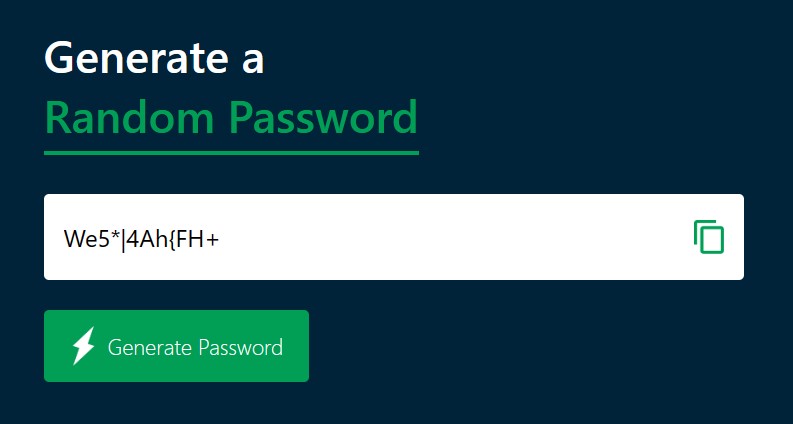
Random Password Generator

S
I am a Student who lives and breathe Software development.
Math.random() function to generate random password
<!DOCTYPE html>
<html lang="en">
  <head>
    <meta charset="UTF-8" />
    <meta name="viewport" content="width=device-width, initial-scale=1.0" />
    <title>Random Password Generator</title>
    <link rel="stylesheet" href="sheet.css" />
  </head>
  <body>
    <div class="container">
      <h1>Generate a <br /><span>Random Password</span></h1>
      <div class="display">
        <input type="text" id="Password" placeholder="Password" />
        <img src="rpg_img\images\copy.png" alt="" />
      </div>
      <button onclick=" createPassword()">
        <img src="rpg_img/images/generate.png" alt="" /> Generate Password
      </button>
    </div>
    <script>
      const PasswordBox = document.getElementById("Password");
      const length = 12;

      const upperCase = "ABCDEFGHIJKLMNOPQRSTUVWXYZ";
      const lowerCase = "abcdefghijklmnopqrstuvwxyz";
      const number = "012345689";
      const symbol = "~`! @#$%^&*()_-+={[}]|\:;<,>.?/ ";
      const allchars = upperCase + lowerCase + number + symbol;
      function createPassword() {
        let password = "";
        password += upperCase[Math.floor(Math.random() * upperCase.length)];
        password += lowerCase[Math.floor(Math.random() * lowerCase.length)];
        password += number[Math.floor(Math.random() * number.length)];
        password += symbol[Math.floor(Math.random() * symbol.length)];
        while (length > password.length) {
          password += allchars[Math.floor(Math.random() * allchars.length)];
        }
        PasswordBox.value = password;
      }
    </script>
  </body>
</html>
* {
  margin: 0;
  padding: 0;
  font-family: "Segoe UI", Tahoma, Geneva, Verdana, sans-serif;
  box-sizing: border-box;
}
body {
  background: #002339;
  color: #fff;
}
.container {
  margin: 12%;
  width: 90%;
  max-width: 700px;
}
.display {
  width: 100%;
  margin-top: 50px;
  margin-bottom: 30px;
  background: #fff;
  color: #333;
  display: flex;
  align-items: center;
  justify-content: space-between;
  padding: 26px 20px;
  border-radius: 5px;
}
.container h1 {
  font-weight: 500;
  font-size: 45px;
}
.container h1 span {
  color: #019f55;
  border-bottom: 4px solid #019f55;
  padding-bottom: 7px;
}
.display img {
  width: 30px;
  cursor: pointer;
}
.display input {
  border: 0;
  outline: 0;
  font-size: 24px;
}
.container button img {
  width: 28px;
  margin-right: 10px;
}
.container button {
  border: 0;
  outline: 0;
  background: #019f55;
  color: #fff;
  font-size: 22px;
  font-weight: 300;
  display: flex;
  align-items: center;
  justify-content: center;
  padding: 16px 26px;
  border-radius: 5px;
  cursor: pointer;
}